

A practical workflow for taking an AEC project from model setup to coordinated, issue-ready construction documents.
| Category | BIM Production / AEC Workflow |
| Audience | Architects, BIM coordinators, BIM managers, contractors and AEC production teams |
| Reading time | 10–12 minutes |
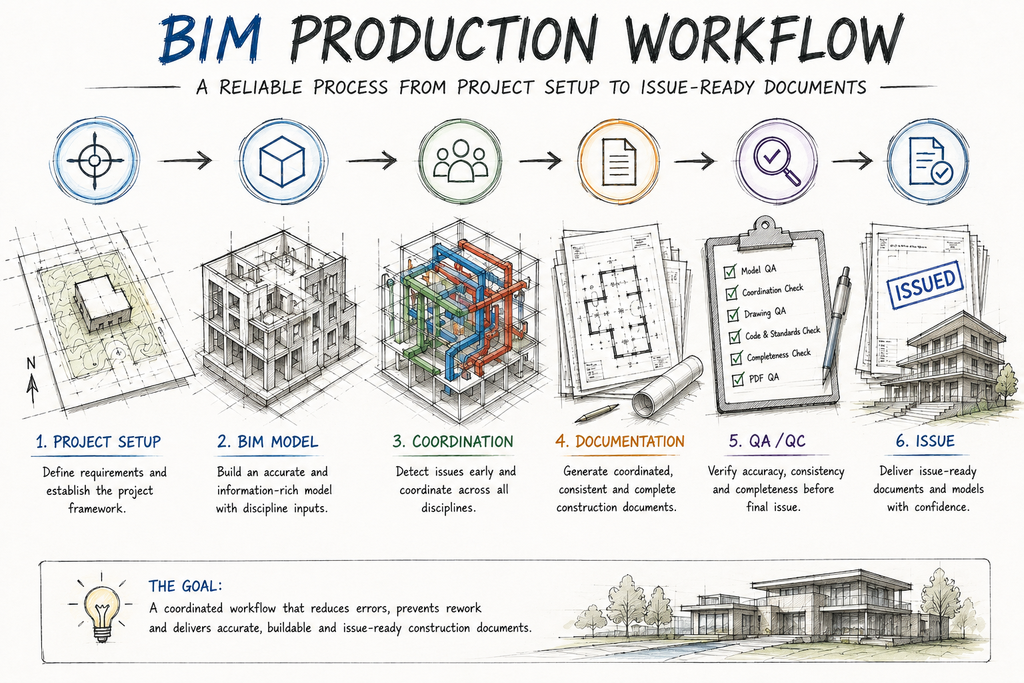
Visual 1 — BIM production workflow overview
A BIM Project Can Go Wrong Before the First Wall Is Modeled
Most BIM production problems are blamed on modeling. That is often too late.
A project can already be heading toward documentation problems because the team never properly established:
- project coordinates
- levels and grids
- model structure
- naming conventions
- family standards
- information requirements
- view strategy
- responsibility between disciplines
- coordination milestones
- QA/QC checkpoints
Once those decisions are embedded in a model, changing them becomes increasingly expensive.
A reliable BIM workflow therefore starts before production modeling. The objective isn’t simply to create a 3D model. It is to create a controlled information environment in which the model can reliably support coordination, documentation and project delivery.
Table of Contents
- 1. What a BIM Production Workflow Actually Controls
- 2. Why Project Setup Matters More Than Most Teams Think
- 3. Step 1 — Define What the Model Is Supposed to Deliver
- 4. Step 2 — Establish the Project Framework
- 5. Step 3 — Control Coordinates, Levels and Grids
- 6. Step 4 — Establish Modeling and Information Standards
- 7. Step 5 — Build the Model in a Controlled Sequence
- 8. Step 6 — Design the Documentation Strategy Early
- 9. Step 7 — Coordinate Before Problems Become Embedded
- 10. Step 8 — Use Milestone-Based QA/QC
- 11. Step 9 — Control Design Changes
- 12. Step 10 — Review the Model and the Documents Separately
- 13. The Complete BIM Production Workflow
- 14. One Design Change Through the BIM Workflow
- 15. What a Reliable BIM Production Team Actually Controls
- 16. Practical BIM Production Checklist
- 17. The Most Important Principle
- 18. Conclusion
- 19. FAQs
1. What a BIM Production Workflow Actually Controls
A BIM workflow is not simply:
Open Revit → Model → Make Sheets → Export PDF
That approach can work on a small, simple project. It becomes fragile as soon as multiple people, disciplines or deliverables are involved.
A production workflow controls how information moves through the project:
Requirements → Setup → Modeling → Coordination → Documentation → QA/QC → Issue
Each stage creates information that the next stage depends on. If the first stage is poorly controlled, later stages inherit the problem.
For example: incorrect coordinates → misaligned linked models → incorrect coordination → incorrect documentation → site confusion.
The modeling team may have modeled every wall correctly. The workflow was still wrong.
2. Why Project Setup Matters More Than Most Teams Think
Project setup is often treated as administrative work. It shouldn’t be.
The initial setup establishes the framework within which the model operates.
- project template
- units
- levels
- grids
- coordinates
- linked models
- naming conventions
- view organization
- browser organization
- families
- parameters
- sheets
- title blocks
- worksharing strategy
- project phases
- design options
- model ownership
A template should not contain everything a previous project happened to contain. It should contain what the next project actually needs. A bloated template can be just as problematic as an empty one.
3. Step 1 — Define What the Model Is Supposed to Deliver
Before modeling begins, answer a deceptively simple question:
What is this model being built for?
- Design development
- Construction documentation
- Coordination
- Quantity extraction
- Visualization
- Fabrication
- Construction planning
- Existing-condition documentation
- Client handover
Sometimes it is several of these. But they should not be assumed to have identical requirements.
A model created primarily for visualization does not automatically contain the information required for reliable construction documentation. Likewise, a coordination model may have different information requirements from a handover model.
Define the deliverables first
- Model deliverable — RVT, IFC or federated model
- Documentation deliverable — plans, elevations, sections, details, schedules and permit sheets
- Coordination deliverable — clash reports, coordination views and issue tracking
- Information deliverable — required parameters, asset information, schedules and data exports
4. Step 2 — Establish the Project Framework
Before detailed modeling, establish the project skeleton.
Levels
- Existing levels
- Finished floor levels
- Structural levels
- Roof levels
- Other critical datums
Grids
- Architectural grids
- Structural grids
- Major reference lines
Project orientation
- Project North
- True North
- Site orientation
Project coordinates
- Survey point
- Project base point
- Shared coordinates where applicable
This isn’t just software housekeeping. It creates the spatial framework that the rest of the project depends on.

Visual 2 — Project setup: levels, grids, coordinates and linked disciplines
5. Step 3 — Control Coordinates, Levels and Grids
This deserves its own step because coordination errors frequently originate here.
When architectural, structural and MEP models are linked, they need a reliable relationship to one another.
Before linking models, verify:
- Origin/reference points
- Rotation
- Elevation
- Grid alignment
- Building position
- Survey information
- Project North / True North
If the models are incorrectly positioned, coordination can become misleading. A clash report generated from badly positioned models is not useful coordination. It is just a precise report of the wrong relationship.
6. Step 4 — Establish Modeling and Information Standards
Now define how the team will model.
Model standards
- Naming
- Family conventions
- Type naming
- Worksets
- Phasing
- Design options
- View naming
- Sheet numbering
- Detail naming
- Shared parameters
- Required project parameters
Information standards
- Which parameters are required?
- Who is responsible for entering them?
- At what project stage?
- Where will they be checked?
- Which information is client-required?
- Which information is actually needed for the intended use?
This is where a BIM Execution Plan or equivalent project information-management process becomes valuable. BIM should be treated as an information-production process, not merely a modeling exercise.
7. Step 5 — Build the Model in a Controlled Sequence
A common production mistake is to let everyone start modeling whatever they need. That creates a model. It doesn’t necessarily create a controlled model.
A more reliable sequence is:
- Reference framework — coordinates, levels and grids
- Primary geometry — walls, floors, roofs and major structural elements
- Openings and major components — doors, windows, shafts and stairs
- Building systems — MEP, fixtures, equipment and major service routes
- Documentation information — rooms, tags, schedules, details and annotation
The exact sequence will vary by discipline and project. The principle is more important: build dependencies before dependent information.
8. Step 6 — Design the Documentation Strategy Early
Many BIM teams model first and ask how they will document it later. That reverses the relationship.
If the BIM model is intended to produce construction documents, the documentation requirements should influence the model from the beginning.
- Required plans
- Required sections
- Elevations
- Enlarged plans
- Details
- Schedules
- Legends
- Keynotes
- Sheet structure
- View templates
- Annotation standards
The model should support the drawings. Not the other way around.
9. Step 7 — Coordinate Before Problems Become Embedded
Coordination shouldn’t begin when the project is almost finished. By then, changes can affect model geometry, views, details, schedules, sheets and consultant models.
Early coordination
- Building position
- Levels
- Grids
- Major structure
- Major shafts
- Major equipment
Mid-stage coordination
- Openings
- Ceiling zones
- Vertical shafts
- Structural interfaces
- Major MEP routes
Pre-CD coordination
- Critical clearances
- Penetrations
- Equipment access
- Architectural interfaces
- Documentation implications
10. Step 8 — Use Milestone-Based QA/QC
A common mistake is: Model → Finish everything → QA/QC. That is expensive.
Instead: Model → Check → Continue
30% Review
- Setup
- Coordinates
- Levels
- Grids
- Primary geometry
- Major design intent
60% Review
- Model development
- Openings
- Major coordination
- Documentation structure
- Key information
90% Review
- CD completeness
- Details
- Schedules
- References
- Consultant coordination
- Model-to-sheet consistency
Final Issue Review
- Revisions
- Sheet index
- PDF output
- Legibility
- Final coordination
- Deliverable requirements
The purpose isn’t to repeat the same checklist four times. Each review should ask different questions appropriate to the project’s maturity.

Visual 4 — QA/QC milestones: 30% → 60% → 90% → Final Issue
11. Step 9 — Control Design Changes
A design change should never be considered complete merely because someone changed the model element.
Example: window size changes. What else could be affected?
- Floor plan
- Elevation
- Schedule
- Wall section
- Detail
- Structural opening
- MEP coordination
- Exterior appearance
- Interior finish
- Sheet annotation
The production question should be: What information depends on this element?

Visual 3 — One design change can create multiple BIM and documentation impacts
12. Step 10 — Review the Model and the Documents Separately
This is a critical distinction.
Model review asks:
- Is the geometry correct?
- Are elements placed correctly?
- Are types correct?
- Is information populated?
- Are relationships correct?
- Are models coordinated?
Drawing review asks:
- Are dimensions correct?
- Are tags correct?
- Are references correct?
- Are views readable?
- Are details appropriate?
- Are schedules correct?
- Are sheets complete?
Final PDF review asks:
- Does the exported document look correct?
- Are lineweights readable?
- Is text legible?
- Are sheets in the correct order?
- Are revisions correct?
- Is anything missing?
These are three different QA/QC activities. A model can pass one and fail another.
13. The Complete BIM Production Workflow
- 01 — DEFINE — Project requirements
- 02 — SET UP — Template + standards + coordinates + levels + grids
- 03 — MODEL — Controlled geometry + information
- 04 — COORDINATE — Architecture + Structure + MEP
- 05 — DOCUMENT — Views + details + schedules + sheets
- 06 — REVIEW — Milestone QA/QC
- 07 — CHANGE CONTROL — Track design impacts
- 08 — FINAL QA/QC — Model + drawings + PDF
- 09 — ISSUE — Approved deliverables
The question should not be how quickly the team can finish the model. The better question is how reliably information can move from design intent to an issue-ready deliverable.
14. One Design Change Through the BIM Workflow
Let’s follow a single example: window size changes.
- Model — The window type or instance is changed.
- Views — Plans, elevations and sections update.
- Schedules — The window schedule reflects the new type/size where the model is correctly structured.
- Details — Relevant head, sill and jamb conditions are reviewed.
- Coordination — Structural and MEP interfaces are checked where applicable.
- Documentation — Affected dimensions, tags, references and sheets are reviewed.
- QA/QC — The change is verified across the affected deliverables.
That’s the difference between changing a BIM element and managing a BIM change.
15. What a Reliable BIM Production Team Actually Controls
A mature production team isn’t only checking whether people are modeling correctly. It controls:
- Inputs — What information enters the model?
- Process — How is that information developed?
- Coordination — How is it checked against other disciplines?
- Documentation — How does model information become drawings?
- Changes — How are revisions propagated?
- Outputs — What exactly is delivered?
| Decision | Owner | When | Verification |
| Coordinates | BIM Lead | Setup | Coordination review |
| Levels / Grids | Design / BIM Lead | Setup | Model review |
| Families | BIM / Production Team | Production | Standards check |
| Model information | Discipline Lead | Production | Data / model review |
| Coordination | BIM Coordinator | Milestones | Coordination review |
| Documentation | Production Team | Documentation | Drawing QA |
| Final deliverable | QA/QC Reviewer | Issue | Independent final review |
16. Practical BIM Production Checklist
Before production begins
- Project requirements are defined
- Model uses are identified
- Deliverables are identified
- Appropriate template is selected
- Units and standards are established
- Coordinates are verified
- Levels are verified
- Grids are verified
- Naming conventions are established
- Model responsibilities are assigned
During production
- Primary geometry is controlled
- Families/types follow project standards
- Required information is populated
- Linked models are correctly positioned
- Coordination occurs at planned milestones
- Critical design changes are tracked
- Documentation is developed alongside the model
Before issue
- Model QA completed
- Drawing QA completed
- Model-to-sheet consistency checked
- Schedules checked
- Details checked
- References checked
- Revisions checked
- Final PDF reviewed
- Deliverable requirements verified
- Independent final review completed
17. The Most Important Principle
A reliable BIM workflow isn’t the one with the most rules. It’s the one where each important decision has a clear owner, a clear stage and a clear verification point.
This is what makes the workflow repeatable.
18. Conclusion
A reliable BIM production workflow doesn’t begin with modeling. It begins with clarity.
Clarity about:
- What the model is for
- What information is required
- Who owns each part
- How the project is positioned
- How disciplines will coordinate
- How documentation will be produced
- How changes will be controlled
- How quality will be verified
The strongest BIM teams don’t simply model faster. They create systems that make errors harder to create and easier to detect.
The goal isn’t: Model → Drawings
It is: Requirements → Controlled Model → Coordinated Information → Verified Documentation → Reliable Deliverable
19. FAQs
When should BIM project setup begin?
Before detailed production modeling. The team should establish project requirements, model uses, standards, coordinates and other foundational controls first.
Is a Revit template enough to create a reliable BIM workflow?
No. A template can establish a consistent starting environment, but project-specific requirements, responsibilities, coordination procedures and QA/QC still need to be defined.
Should documentation planning begin after modeling?
No. If the model is intended to produce construction documentation, the required drawings and information should influence the modeling strategy from the beginning.
How often should BIM coordination happen?
There is no universal frequency. Coordination should occur at meaningful project milestones and before major downstream decisions become difficult to change.
Can BIM eliminate rework?
No. BIM can help identify and manage certain issues earlier, but design changes, site conditions and coordination decisions will still occur.
What is more important: model accuracy or drawing accuracy?
Both. A correct model does not guarantee correct drawings, and a polished drawing set does not guarantee a correct model.
Who should control the BIM production workflow?
The exact role varies by project, but responsibilities should be explicitly assigned among the BIM lead/manager, discipline leads, production team and QA/QC reviewer.
What is the biggest BIM workflow mistake?
Treating BIM as a modeling task rather than an information-production process.
How AtekOne Supports BIM Production
AtekOne Design Solutions provides BIM and AEC production support for architecture, construction and related AEC teams.
Our production capabilities include:
BIM Modeling · Revit Production · Construction Documentation · BIM Coordination · Permit Drawing Production · CAD-to-BIM · Scan-to-BIM · Shop Drawing Support
The objective isn’t simply to produce a model. It is to help AEC teams develop coordinated information and reliable project deliverables.
For firms that need additional production capacity, external BIM support can be structured around defined project scopes, milestones or production workloads.
Explore AtekOne’s BIM & AEC Production Services →
SEO / Website Publishing
| SEO Title | How to Build a Reliable BIM Production Workflow Before Documentation Starts |
| Meta Description | Learn how to build a reliable BIM production workflow—from project setup and coordination to documentation, QA/QC and final issue. |
| URL Slug | reliable-bim-production-workflow |
| Primary Keyword | BIM production workflow |
| Secondary Keywords | BIM workflow; Revit production workflow; BIM project setup; BIM coordination workflow; BIM QA/QC; AEC production workflow; Revit documentation workflow; BIM modeling standards; BIM project management; construction documentation workflow |
| Category | BIM Production |
| Tags | BIM · Revit · BIM Coordination · QA/QC · AEC Production · Construction Documentation · BIM Workflow |
Internal-Link Strategy
- Blog 1 → Blog 3 — Anchor: drawing-set QA/QC
- Blog 2 → Blog 3 — Anchor: BIM production workflow
- Blog 3 → Blog 4 — Anchor: buildable construction documentation
This creates a deliberate chain: QA/QC → Failure Analysis → Prevention Workflow → Buildable Documentation.
Final Editorial Rating
| Area | Rating |
| Technical depth | 9.8/10 |
| AEC relevance | 9.9/10 |
| Practical usefulness | 9.8/10 |
| Commercial relevance | 9.6/10 |
| SEO structure | 9.7/10 |
| Authority positioning | 9.8/10 |
| Overall | 9.8/10 |